Finding the right SVG icon should take seconds. In reality, it often takes much longer.
You search one icon library, don’t find what you need, open another website, search again, compare styles, download an icon, realise it doesn’t match the rest of your UI, and start over.
If you’ve ever spent more time searching for an icon than building the feature itself, you’re not alone.
This guide shares practical ways to find SVG icons faster, keep your designs consistent, and avoid common mistakes that slow down your workflow.
🎥 Prefer watching?
Watch the video below to see how to search, preview, customize, and copy SVG icons for your next project in just a few clicks.
What Is the Fastest Way to Find SVG Icons?
The fastest way to find SVG icons is to search multiple icon libraries from a single place, use descriptive keywords, stick to one icon style, and save commonly used icons for future projects. These simple habits can reduce the time spent searching from several minutes to just a few seconds.
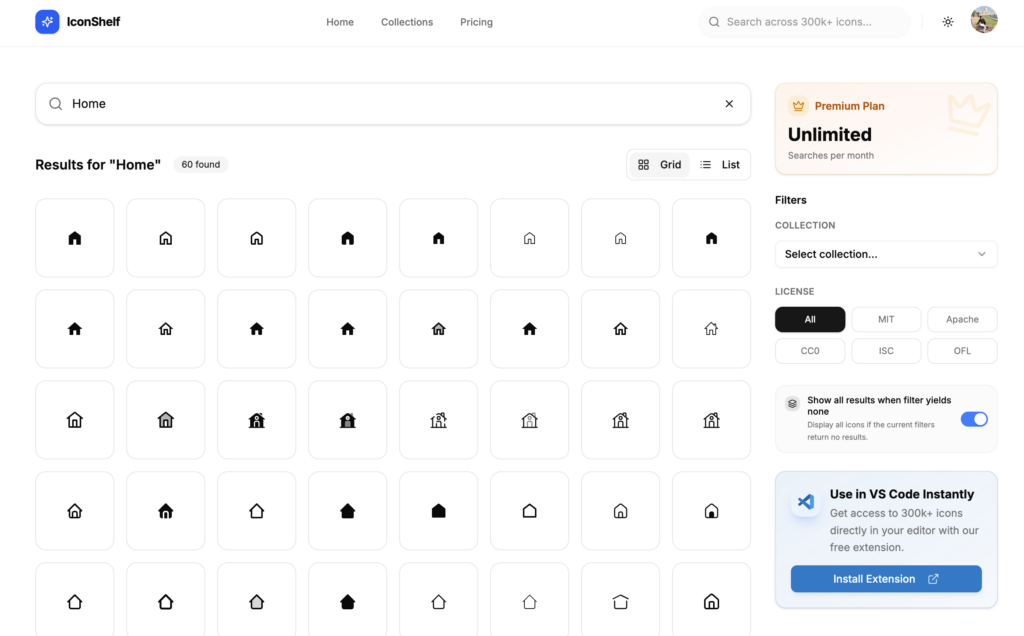
Instead of opening multiple icon websites, many developers use an icon search platform like IconShelf, which lets you search hundreds of thousands of SVG icons from multiple collections in one place. This makes it easier to compare styles, preview icons, and copy the one you need without constantly switching between websites.
The rest of this guide explains these techniques in more detail and shows how they can help speed up your design and development workflow.
Why Is It So Hard to Find the Right SVG Icon?
There are thousands of excellent SVG icons available online. The problem isn’t the lack of icons; it’s that they’re spread across dozens of different libraries.
Every website has its own search engine, naming conventions, categories, and design style.
For example, the same icon could be called:
User
Person
Profile
Account
Member
Avatar
If one website doesn’t use the keyword you’re searching for, you might incorrectly assume the icon doesn’t exist. That’s why developers often end up opening multiple tabs before finding the right match.
Why SVG Icons Are the Best Choice
Before discussing how to find icons faster, it’s worth understanding why SVG icons have become the standard for modern websites.
SVG icons are:
Lightweight
Infinitely scalable
Easy to customise
Compatible with CSS
Perfect for dark mode
Supported by every modern browser
Unlike PNG images, SVG icons stay sharp across all screen sizes and usually require much less storage.
Start With Better Search Keywords
One of the easiest ways to find icons faster is to improve your search terms. Instead of searching for only one word, think about related meanings.
For example, instead of searching for user, try searching profile, account, member, person and avatar
Different icon libraries describe icons differently. Trying a few related keywords often finds the icon much faster.
Search Multiple Icon Libraries at Once
Opening five or six icon websites every time you need an icon quickly becomes frustrating.
Instead of searching libraries one by one, it’s much faster to search across multiple collections from a single place.
This lets you:
Compare similar icons.
Find missing icons more quickly.
Keep your workflow focused.
Spend less time switching between browser tabs.
If you regularly work with SVG icons, using a unified search tool can save hours over the course of a project.
Keep Your Icons Consistent
One common mistake is mixing icons from several unrelated libraries.
For example:
Outline search icon
Filled home icon
Rounded settings icon
Sharp notification icon
Each icon looks good individually, but together they make the interface feel inconsistent. Before adding a new icon, check whether it matches the style you’re already using. Keeping a consistent icon style creates a more professional user experience.
Choose SVG Instead of PNG Whenever Possible
Some websites still use PNG images for simple interface icons. For modern web applications, SVG is almost always the better option.
SVG icons:
Scale perfectly.
Load quickly.
Can change colour using CSS.
Support animations.
Don’t become blurry.
For UI elements like menus, buttons, dashboards, and navigation, SVG is usually the best choice.
Avoid Downloading Huge Icon Packages
Many developers install an entire icon package just to use a handful of icons.
While modern build tools can remove unused code, downloading and managing large packages isn’t always necessary.
If you only need a few icons, copying optimised SVG code directly into your project is often the simplest approach.
This keeps your project smaller and reduces unnecessary dependencies.
Save Icons You Use Frequently
If you build admin dashboards, SaaS applications, or websites regularly, you’ll notice that the same icons appear again and again.
Examples include:
Search
Home
User
Settings
Calendar
Bell
Download
Upload
Keeping a collection of frequently used icons means you won’t have to search for them every time you start a new project. Small improvements like this can save a surprising amount of time.
Preview Icons Before Using Them
An icon may look perfect in search results but feel completely different once it’s added to your interface.
Before copying an icon, check:
Does it match your existing style?
Is the stroke width consistent?
Does it look good at small sizes?
Will it work in both light and dark themes?
Taking a few extra seconds to preview the icon helps avoid redesign work later.
Optimise Your SVG Icons
Not every SVG is optimised for production. Icons exported from design software often include:
Metadata
Hidden layers
Comments
Unused attributes
Extra XML
All of these increase file size without improving the appearance.
Optimised SVG icons load faster and keep your project cleaner. If you’re creating custom icons, tools like SVGO can remove unnecessary code automatically.
Common Mistakes When Searching for Icons
Many developers accidentally make their workflow slower. Some of the most common mistakes include:
Searching for only one keyword.
Opening multiple icon websites.
Mixing different icon styles.
Downloading huge icon packages.
Using PNG icons instead of SVG.
Forgetting to optimise custom SVG files.
Reusing inconsistent icon sets.
Avoiding these mistakes can save time on every project.
A Faster Way to Search SVG Icons
After trying many different workflows, one of the biggest improvements comes from reducing the amount of searching itself.
Instead of opening multiple websites, many developers prefer using a single search platform that brings together icons from multiple collections.
It lets you search more than 300,000 optimised SVG icons from multiple libraries in one place. You can preview icons, customise them, and copy the SVG code directly into your project without downloading large icon packages.
Whether you’re building with React, Vue, Next.js, Nuxt, Angular, or plain HTML, having one place to search can make finding icons much faster.
Final Thoughts
Finding SVG icons doesn’t have to interrupt your workflow.
Using better search terms, sticking to a consistent icon style, choosing optimised SVG files, and searching multiple icon libraries from one place can save hours over the lifetime of a project.
The less time you spend hunting for icons, the more time you can spend building great products.
Share Post
Rahul Kumar Singh
Tech enthusiast who finds joy in coding and playing games